Switch to your new stream key
Povi's streaming upgrade on November 25, 2026 came with a new stream key for every channel. Here's how to switch to it in OBS, StreamYard or Restream.
🚨 Your previous stream key no longer works. We moved Povi's live video backhaul to new infrastructure built with FrameWorks, so you cannot go live until you swap in the new one. It only takes about a minute.
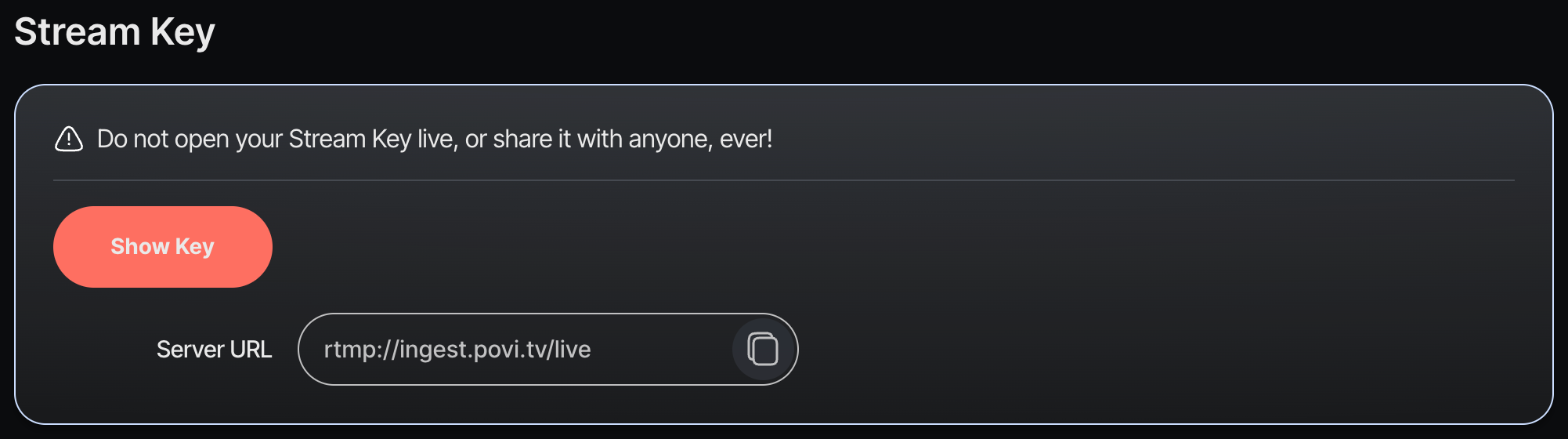
Step 1: Copy your new key and server URL
- Open Channel settings in your creator dashboard and scroll down to the Stream Key card.
- Click Show Key, then click the copy icon next to your key. It copies while the key stays hidden.
- Copy the Server URL below it: rtmp://ingest.povi.tv/live
Step 2: Paste them into your streaming software
Copy and paste one at a time: the server URL first, then your key.
OBS Studio
- Open Settings and choose Stream.
- Set Service to Custom....
- Paste the server URL into Server and your key into Stream Key.
- Click Apply, then OK.
StreamYard, Restream and other multistreaming tools
Open the custom RTMP destination you set up for Povi, replace the server URL and the stream key, and save. If your tool won't let you edit it, remove the destination and add Povi again as a new custom RTMP destination.
Step 3: Check that it works
Start streaming the way you normally do, then open Live Control and check that your stream comes through.
What's different now
- Steadier streams. The move fixes most of the dropped streams, missed recordings and failed uploads some of you ran into.
- Sub-second latency. Viewers can watch your stream over WebRTC with less than a second of delay.
- Room to grow. The new setup opens the door to future built-in features like viewer video call-ins and native on-stream collabs.
- One downside. Uploads are only up to 2 GB for now, but larger files will be coming in December.
Troubleshooting
My software says it can't connect
Make sure you replaced both the server URL and the stream key. Then copy both again from Channel settings, in case a space or a missing character slipped in.
Someone may have seen my key
Anyone with your stream key can stream to your channel. Never show it on stream or share it with anyone. If you think it leaked, contact us right away.